Search This Blog

Showing posts with label Database review. Show all posts

Wednesday, 20 December 2017

Search Engine Review by Library PTS (Part Time Student Librarian) - Using EDS

http://search.ebscohost.com.ezp.imu.edu.my/login.aspx?authtype=ip,uid&profile=eds
Review by Ng Qi En
Click the image above to access the search engine


1.   Which feature(s) I like the most about the search engine?
Ebsco Discovery Service (EDS) is the search engine powered by EbscoHost for IMU. The most amazing thing about this search engine is that it can search for any e-journals, e-books, articles from all the databases subscribed by IMU and books in campus library. With only one search engine, result from all the databases will be included, for example, Ovid database, Clinical Keys, Science Direct, EbscoHost and more. Moreover, the advanced search function will filter the result to a more precious and relevant finding. 

 
First, the EDS search engine can be found at the home page of IMU library portal under Search Engines tab


Select advanced search.


The key words that I have chosen are related to my course of study, which is Dentistry. The first keyword is "dental impression material" and "elastomer" is the second keyword. With the second keyword, the result has reduced from 2,860,209 (dental impression material) to 7778.


Limit the search to “full text” and pick source type “academic journals”. The search results have decreased significantly.


From the result, full text can be accessed in PDF format.


If the full text is available from ScienceDirect, the full text can be accessed directly.


When the full text is available in several databases, ‘Full text Finder’ will be seen. Click “Full Text Finder”.


Links to the full text will be listed. Click on any link to read the full text. For example, I clicked the first link to find full text at Elsevier’s Clinicalkey.


 Full text can be read online, saved, downloaded, emailed or printed


2.   Has the search engine benefit you in learning process?
Yes, the search engine is not only convenient, it is time saving. With just one click, we can search all the journals, articles and books subscribed by IMU. The advanced search function and other function to refine the result really helped me a lot in getting the articles that I am interested in reading.

3.   Does the search engine suit you or any other programs and why?

Yes, the search engine suit everyone from all programs well because this search engine covers all the databases which are subscribed for the entire student in IMU.

4.   Would you recommend this search engine to your colleagues and why?
Definitely, this is just like a master key to all the databases. It will save a lot of time, we do not need to search for the article from more than 10 databases available in library portal but only 1 search engine. I would call EDS the Google of IMU library portal. 

Database Review by Library PTS (Part Time Student Librarian) - Using CDR


http://14.102.151.191/xmlui/
Review by Soh Yin Han
Click the image above to access the database


1.   Which feature(s) I like the most about the database?
IMU Central Digital Repository (CDR) Database is a digital collection of works of IMU faculty members and students. It comprises all the research projects, community project reports, portfolios, papers (including theses) written by students and faculty members. This database is freely accessible by IMU registered users only (active student and faculty members). Below is the steps on how to utilize the database:

 
First, click Login button on top right of the page


 Then, enter your IMU computer username and password.


Then click on “Advance search”

  
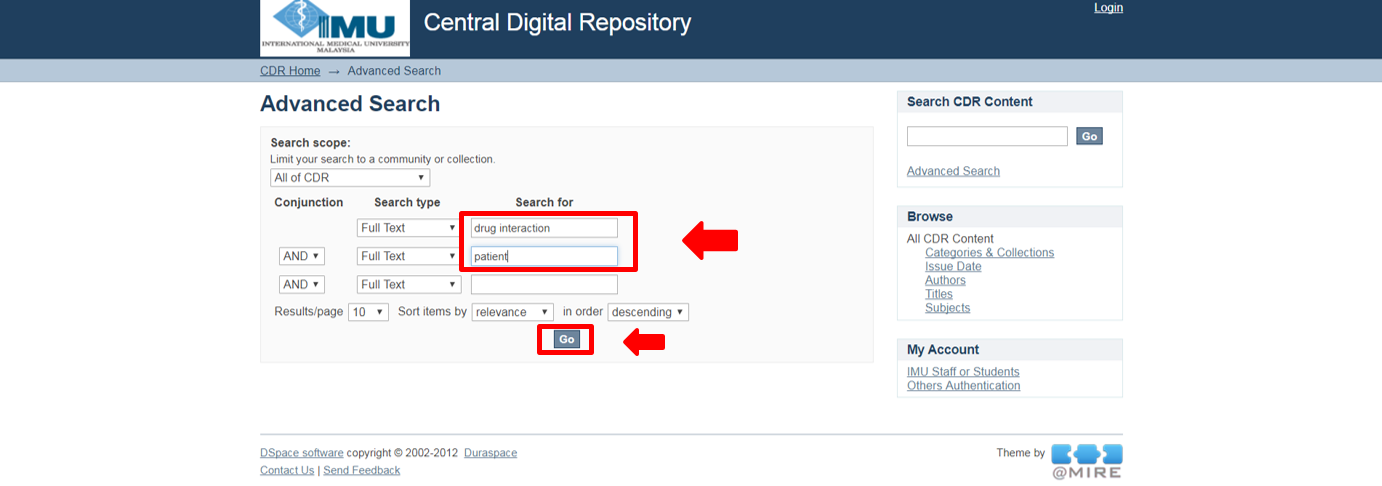
Enter keyword(s) in the “search for” boxes and click “Go”.


All the results related to the search will be displayed. Click any of the titles


   Abstract is provided. Click on padlock button to obtain the full text in PDF form.


 Other than that, you are also able to to browse the collection by categories below:
                                Others:  Papers by faculty members
                                Postgraduate: Masters and PhD collections
                                Undergraduate: Bachelor's degree collections


 After selecting the category, click “sub-categories” to access to all the collections of the university’s intellectual output.
 
 
All the titles will be displayed. 


2.   Has the database benefit you in your learning process?
Yes, all research papers are easily accessible. They are definitely useful for me as a semester 6 student as I am going to plan for my research for the upcoming semester. It will also aid in writing proposal for the research. Reliable information gathering is needed for writing proposal and thesis for research. Therefore, I have no worries on getting the accurate and reliable information.

3.   Does the database suit you or any other programs and why?
Yes, the database suit me as a pharmacy student as well as students from other programs as the database is not restricted to those who are going to do research only as it consists of community project reports, portfolios, papers written by faculties other than research projects. Furthermore, students will be able to find a lot of useful information for their portfolios as most the information are healthcare related. 

4.   Would you recommend this database to your colleagues and why?
Definitely yes because it is freely accessible by all IMU students especially my fellow batch mate who are going to research. It is a good platform for students to obtain useful sources for their assignment too and enable us to appreciate all the hard work done by IMU students.

Wednesday, 29 November 2017

Database Review by Library PTS (Part Time Student Librarian) - Using Ovid Database

 http://ovidsp.tx.ovid.com.ezp.imu.edu.my
 Review by Chua Hoe Wei
Click the image above to access the database


1.   Which feature(s) I like the most about the database?
Ovid database has an amazingly wide variety of different journals and articles available to begin with. Despite having more than 400 different full text journals available, they are all relevant to healthcare and acts as a comprehensive source of reliable information for any student or professional. Furthermore, the “Advanced Search” feature and “Publication search” feature streamline the searching process when hunting down a relevant article to a topic or a specific  article.


First, select Journals@Ovid Full Text after you access the database from the Library portal and to ensure the items you find will be in complete, full text.


Then select “Advanced Search”.
 
 
 After that, enter the first keyword and click search. I had chosen to go for a topic which was related to my course of chiropractic.

 
Then enter the second keyword and search.


 Enter the third keyword and search.


After searching for the third keyword, you can view your search history at the top left corner which says “Search History”.


Select the first three keywords by checking their boxes. Then click “AND” below the history where it says “Combine with:”.  


 Immediately, Ovid will conveniently combine your three searches, giving you the results above. 


 To further ensure that the search results yield full text articles which will be of most use, click “Search History” again and tick box 4. Then, click Ovid Full Text Available and later, click Search button. This will make sure that results obtained from search 4 will only be comprised of full text articles (result no. 5)


From the results, I chose to get the PDF version of the article of search result 3 as it was the most relevant one.  


You can download as a PDF or print the article by clicking the available buttons on top right of the page.


2.   Does the database benefit you in your learning process?
Yes. The database was very useful to me as well as to my friends during semester 6 when we were planning for our research project the next semester and preparing our proposal. Planning the proposal required a lot of researching as we needed current and reliable information. The emphasis on evidence-based knowledge here in IMU further encourages students to use reliable sources such as Ovid database.

3.   Does the database suit you or any other programs and why?
Yes, Ovid definitely suits my program as well as most other programs. This is because all the journals are related to the healthcare field and with so much information and such a wide range available, students from IMU will undoubtedly be able to find useful and updated information on the topic of their choice.

4.   Would you recommend this database to your colleagues and why?
Yes I would as the information available would be critical to us in semester 6, 7 and 8 when we are starting and conducting  our research as well as undergoing clinical internship which requires the latest information on treatment techniques and guidelines.

Database Review by Library PTS (Part Time Student Librarian) - Using Dynamed Plus

http://search.ebscohost.com.ezp.imu.edu.my/Community.aspx?community=y&authtype=ip&ugt=62E771363C0635073746353632253E0225E362D36713649367E320E330133603&encid=22D731163C4635473726350632953C77353372C377C374C377C370C370C376C33013&selectServicesToken=Axm8N_7rIzoqAh5r4ZJC_wEruVXmAeZXj0etBvg1v5_0FiKmJe2YSvtrx-V-akMSnvY3_CZsFrI49h0t227mR9avKspFPOw3IUMA6Kfimv3HR6A-oZOAWkAuxic46FMukyV4xbfcSdyfiV_zcL8qTQlXIjGzYdMEmD5laEjmCHV_dT4LL-1JZvb_D-HDyLurrl_iGlSeLdnrEueIr378fHl2r_5YVU2rmENBGmAKVsasWvHTFyji9MTGXZgbKvnYvMvXvU3DjPd31v0NY411n-7VKhTVpL_yH9WnHJ6YTHIHMAi1i5PN8uW58UyWIQ&IsAdminMobile=N&authpid=dmp
Review by Azlan Tsia Kok Vui
Click the image above to access the database


1.   Which feature(s) I like the most about the database?
The database has a simple interface which allows an easier navigation to the required information. Other than that, the navigation panel at the left-hand side condensed the topics relevant to the keywords so that users can have a fast access to the particular topics. Some images are also included in the search result for a better understanding of the searched keywords.

Here, I will demonstrate on how to utilize this database.

Enter keywords in the search box.


Click on the relevant search result.


Select the topic of interest.


Page showing the background and introduction of the searched topic.


Click on ‘Diagnosis’ on the left panel for a quick access of relevant information regarding diagnosis from a drop-down list.


Click on ‘Treatment’ on the left panel for a quick access of relevant information regarding treatment from a drop-down list.


2.   Has the database benefit you in your learning process?
This database is particularly useful for the preparation of problem-based learning (PBL). It explains the disease in details, including the definition, pathophysiology, diagnostic modalities, and up-to-date treatments among others. The information available are easily understood and mostly in layman’s terms. Apart from that, the information provided are in point form to promote better presentation especially in PBL sessions. The database is also available in app which the installation guide is available here.

3.   Does the database suit you or any other programs and why?

In general, students from all courses will find this database very helpful to learn any diseases. Medical and dental students particularly will be depending a lot on this database to prepare their PBLs. This is because this database contains all the relevant information that are frequently discussed in the PBL sessions. It acts as a one-stop centre that covers from the definition of the disease up to the prevention and screening, eliminating the need to open many website tabs to gather information.

4.   Would you recommend this database to your colleagues and why?
I would strongly encourage students and my colleagues to utilise the database fully because it is very efficient and simplistic. Any questions that arose in the PBL sessions can instantly be answered with the help of this database. Furthermore, the information provided are cited with references at the end of the pages. Therefore, users can rest assured that the information are collected from trusted sources.

Tuesday, 31 October 2017

Database Review by Library PTS (Part Time Student Librarian) - Using Proquest Database

https://search.proquest.com.ezp.imu.edu.my/
Review by Nicole Tay Wuen Rong
Click the image above to access the database


1.   Which feature(s) I like the most about the database?
ProQuest database provides a comprehensive selection of articles focusing on the sciences and technology sourced from various types of publications. Searching for data was made easier by the “advanced search” or the “publications” feature.

The advanced search allows you to type in keywords specific to your area or subject of interest. The “AND” tab can be changed to “OR”, where the former will lead to a list of articles containing both keywords will the latter will includde articles with either one of the keywords. If you choose to limit to full text, the results will show only the articles that IMU has access to while the peer reviewed option will bring you to articles that have been reviewed by other students or staffs in IMU.

 Using Advanced Search


Articles that have the full text or full text-PDF option indicated that IMU staffs and student have full access to them. To download the article, click the Full text-PDF option.

Article available in full text


Alternatively, articles can be searched from specific publications by clicking on “Publications”. “Full text available” indicates that IMU has access to the articles in that publication.

Viewers can also see the list of issues and select a particular issue of that publication.


 Browsing through issues


Users can also choose to download a particular article in an issue instead of the whole issue. This can be done by clicking on “Full text-PDF”. The “Preview” gives users a preview of the article for reference.

Previewing an article


2.   Has the database benefit you in your learning process?
Yes. The database encompasses a wide variety of publications on health sciences, thus it is useful in my course, Pharmacy. The articles provided are up to date and relevant. It is useful for extra reading and keeping myself updated with information on clinical trials and evidence-based research associated with my area or drug of interest.

3.   Does the database suit you or any other programs and why?
Yes, the database suits other programs as well as mine. As it contains many articles regarding health sciences and technology, it would suit the students in IMU regardless of their course. IMU has access to many publications in ProQuest, hence it makes it easy for students to read and download articles of interest.

4.   Would you recommend this database to your colleagues and why?
I would because it is useful for researches and presentation, especially in semester 6 and 7. The database will be able to provide relevant information that are recent and reliable.

Database Review by Library PTS (Part Time Student Librarian) - Using Access Science

http://www.accessscience.com.ezp.imu.edu.my/
Review by Amilia Chai Hui Yong
Click the image above to access the database


1.   Which feature(s) I like the most about the database?
Access Science, from McGraw-Hill Education is the most trustworthy, broad-based, online scientific reference which offers a combination of information through relevant articles as well as media like videos and animations. This database has features that allow users to obtain information and learn in a quick and easy way, which are
i)    Search for keywords & topics
ii)    Articles
iii)    Media


i)    Search for keywords & topics

This feature allows user to type directly type the keywords in the search column to look for the specific articles they want. (Heart disease, osteoporosis, etc) Besides, users can also search through topics, such as health sciences.

Type keyword in search box


Browse according to available topics


ii)    Articles

The article

After a keyword is search, all the relevant articles will appear in context form, and all the keywords the users have typed will be highlighted in yellow. To prevent from losing the top favourite article of the users, the users can even save the specific article they want. On the left of the screen, users can also refine the content type that they want, for example, articles only or research review only. At the same time, users can also narrow down the topic to all topics, or health sciences only and etc to ease the process of searching.

Full text access

After clicking into the article, users can read the article in full text, with all the full explanation as well as the the source of article such as the author’s name, updated year and etc. On the top right of the article, users can find beneficial features like save, cite, email, print, share and link. Users can cite this article on their research project as well as email it and share to their friends on the good articles that they found.


Saving image

Users can also save any images found in the full text article, along with keywords regarding to the topic such as arteriosclerosis which will lead them to another source of information regarding heart disease.


iii)    Media

The media page

As for media, this database allows user to search for keywords on the videos and animations as well as images they want. They can also search by topic on the specific image they want to ease the process of learning.

Downloading a video

For example, an osteoporosis video has been searched and users can either play the video online OR download the video into their device. Besides that, users can make use of the key features at the top right which are save, cite, email, print, share and also link.


2.   Has the database benefit you in your learning process?
Yes, this database has benefit me a lot during my learning process. In pharmacy, we get to prepare a lot of reports and assignments as well as PBL. Lecturers normally emphasise on relevant sources and it is not easy to find videos of animation as well as articles from relevant resources. Access Science aids me a lot on this. Besides, I can also cite the articles in my assignment, and show the videos or animations to my friends during the PBL sessions.

3.   Does the database suit you or any other programs and why?
This database benefits me a lot during my early semester in pharmacy as it contains more on basic health sciences knowledge. I would say, it suits more on students who are in foundation in science or students who are having their early semester in medicine.

4.   Would you recommend this database to your colleagues and why?
I would recommend this database to my juniors, especially those in foundation or early semester of pharmacy as well as medicine. I believe that it will be beneficial to them and aid in their learning process. They will have a better understanding on their syllabus with the aid of videos and animations shown in Access Science.